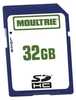
Moultrie Sd Card (1Pk) - 32Gb
| Manufacturer | Moultrie Enterprises | |
| MFG NO | MCA-12603 | |
| SKU | 6182659 | |
| UPC | 053695126036 |
- SUMMARY
- SPECIFICATIONS
- MANUFACTURER
- REVIEWS
Moultries SD memory card is an easy way to expand the number of pictures your digital scouting camera can store. Moultries SD memory card is an easy way to expand the number of pictures your digital scouting camera can store. Simply place the card into the memory card slot until it is fully inserted. View pictures by removing card and placing into an SD-compatible computer TV phone or other device. Sold as a single card - 32GB.
- Upload data erase and reuse without losing quality
- Write-protect switch prevents accidental overwrites or deletes
- Use in all SDHC compatible devices
- Can be used with all 2007 and newer Moultrie game cameras
Formatting your Moultrie memory card is recommended after every time you download pictures from your Moutrie Trail Camera. To format your SD card follow the instructions below:
- Simply put the card in your computer (or memory card reader) go to My Computer.
- Once you have located the SD card on your computer right click on the file
- Click the formatting option
- On the formatting screen select the "32" formatting option.
- Then click ok.
| Specification | Value | |
|---|---|---|
| MFG NO | MCA-12603 | |
| SKU | 6182659 | |
| UPC | 053695126036 |
|
Open Box: Moultrie MCG13310 XA7000I 20 MP Invisible 80 ft White Bark AT&TThe Moultrie Mobile XA7000I Camera Combines The Quality And Reliability Of Moultrie Game cameras With Its Revolutionary Moultrie Mobile Technology To Deliver Game-Camera images From The Field Directly... |
||||||
|
|
|||||||
|
PRICE $150.99
QTY
ADD TO CART
|
|||||||
|
HME Trail Cam 12v Aux Power BoxManufacturer: Walker's Game Ear / GSM OutdoorsMfg No: HME-12VBBSLRSize / Style: HUNTING ACCESSORIES |
||
|
|
|||
|
|||
Moultrie Sd Card (1Pk) - 32Gb
Moultries SD memory card is an easy way to expand the number of pictures your digital scouting camera can store. Moultries SD memory card is an easy way to expand the number of pictures your digital scouting camera can store. Simply place the card into the memory card slot until it is fully inserted. View pictures by removing card and placing into an SD-compatible computer TV phone or other device. Sold as a single card - 32GB.Upload data erase and reuse without losing qualityWrite-protect switch prevents accidental overwrites or deletesUse in all SDHC compatible devicesCan be used with all 2007 and newer Moultrie game camerasFormatting your Moultrie memory card is recommended after every time you download pictures from your Moutrie Trail Camera. To format your SD card follow the instructions below:Simply put the card in your computer (or memory card reader) go to My Computer. Once you have located the SD card on your computer right click on the fileClick the formatting optionOn the formatting screen select the "32" formatting option. Then click ok.
Manufacturer Moultrie Enterprises
Mfg No MCA-12603
SKU 6182659
UPC 053695126036



| 0 | Total: $0.00 |

|